
You are using an out of date browser. It may not display this or other websites correctly.
You should upgrade or use an alternative browser.
You should upgrade or use an alternative browser.
Bug reports, problems, glitches
- Thread starter big soft moose
- Start date
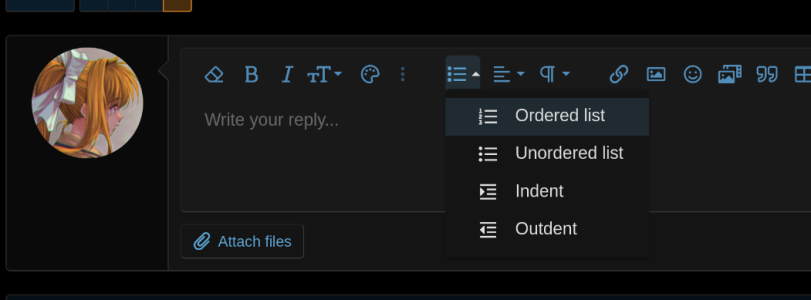

I’ll look into it but I think this is an XF default not a user option

I imagine they designed it that way for building outlines, indenting/outdenting the subcategories as needed by the user.View attachment 590
The Indent and Outdent buttons are inside the lists group. They shouldn't really be there. It makes looking for them confusing. Could that possibly be changed?
- Like
- This
- To
- Make
- Outlines
- Appear
- Slick
- And
- Cool

ps102
Active Member
Is it really? How weird.I’ll look into it but I think this is an XF default not a user option
Huh... I guess that makes sense. I doubt anyone uses it like that though.I imagine they designed it that way for building outlines, indenting/outdenting the subcategories as needed by the user.
I don't think I've ever had occasion to use an indent for any reason on this forum. In fact, using the journalistic no indent double space format on this forum for the last decade has made me drop indents from all other things I type.I doubt anyone uses it like that though.
#cancelindents
Turns out you can customise the menus... ive put them on the top bar for now, but we could also put them in another drop down if we wanted...its only possible on the full screen 900px plus toolbar, on the little ones for phones etc theres no spare slots

When I pick the insert image and the option "By URL", it works fine for the first few days, but after a while it seems like the image disappears. I've only done that trick via Facebook linked images, so maybe it's something wrong with how Facebook handles images. But I thought I'd report anyway.
Here is a link to one of my posts where the image has disappeared, but it has happened to other images I've shared as well.
Link:
Here is a link to one of my posts where the image has disappeared, but it has happened to other images I've shared as well.
Link:

Testing:
Edit:
Seems to work, thanks a lot Hammer!
Edit 2: Linked again, differently.
Edit 3: Linked once more, differently, again.
Edit:
Seems to work, thanks a lot Hammer!
Edit 2: Linked again, differently.
Edit 3: Linked once more, differently, again.

i suspect this is a facebook issue rather than an us issue... if it works once theres no reason why it shouldn't continue to work so long as the url remains valid. Maybe the facebook url changes as more content is added above it... you could check by right clicking a previously linked image on FB and seeining if the url has changed
Yup, that seems to be it. When I first clicked edit to check for the link adress, there was nothing there, so I closed the edit and managed to copy the link. Then I pasted both the link from the forum and from Facebook in two separate windows and checked, they seemed to mismatch a bit. A lot were the same, but there were some differences.i suspect this is a facebook issue rather than an us issue... if it works once theres no reason why it shouldn't continue to work so long as the url remains valid. Maybe the facebook url changes as more content is added above it... you could check by right clicking a previously linked image on FB and seeining if the url has changed
Will try to link in another way in the future.
Thanks!

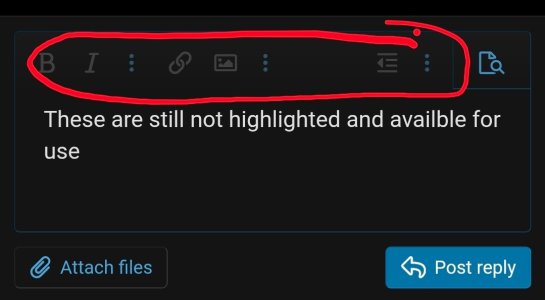
I noticed all of a sudden that edit features for mobile devices dont work anymore.
No Bold, Italic, Underline... no Emoji, no adding links or images.... nothing on the editing bar is available.
I noticed it before, but thought maybe it was a 1 off.
Yeah, still not availble.
They are visible, but are unclickable
No Bold, Italic, Underline... no Emoji, no adding links or images.... nothing on the editing bar is available.
I noticed it before, but thought maybe it was a 1 off.
Yeah, still not availble.
They are visible, but are unclickable
bold check
italics check

not sure... did you try restarting your phone?
Lemme try Baby Billy
italics check
not sure... did you try restarting your phone?
Lemme try Baby Billy

check
check

IDK?
edit function works after posting
check
IDK?
edit function works after posting
Last edited:

Hmmm. Anyone else having the same issue? I'm on a Samsung having no problems with Android.
checking edit function after posting... no issues
checking edit function after posting... no issues

Hmmm. Anyone else having the same issue? I'm on a Samsung having no problems with Android.
checking edit function after posting... no issues
It's not, for me, but I can make it happen. @JT Woody , click on the 3 dots on the left of the preview button, and see if the [] "Toggle BB code" button is available. If it is, try clicking it, see if that restores the other buttons.
Similar threads


- Replies
- 50
- Views
- 1K


- Replies
- 8
- Views
- 470


